Greetings everyone,
First of all I'd like to thank you all for your cordial welcomings and I'm sure some of you will be able to assist someone so computer illiterate as I to solve the problems I face in trying to enjoy MW2 31st CC for windows 95, on my XP sp1 laptop. Essentially, my problem is that each time I try to customize any mech in any way, the instant I try to exit the Mech lab and actually play, I get the in-game error message of, "Mech exceeds Keshisk Maximum defined Tonnage for Mission". I get this message regardless of how heavy my customized mech is and the customizations I make don't exceed the chassis capacity. Sir MMPD Radick, you indicated there is a means of solving this issue with a .dll, unfortunately, I haven't the foggiest clue what a .dll is therefore, prior to fixing the problem, I would appreciate at least some understanding of what I need. The only other issue I have is regarding a post made by Col. Kell regarding the use of an XBox 360 controller to play, Colonel, I installed the drivers as instructed however, when I go to "control panel"/"game controllers", my 360 controller isn't listed although I receive a message at the lower right corner of my screen indicating it was properly installed. Additionally, further in your instructions, you provided a configuration download to facilitate the use of such a controller and stated that the file would have to be downloaded over the existing input.map file; could you please indicate how this is done when you get a chance, thanks. Any assistance on any of the aforementioned issues would be very much appreciated. I thank you all for your time. JD aka Sejanus
Somewhat computer inept needing help w/ xp
Forum rules
Search before asking!
No Swearing!
Search before asking!
No Swearing!
Somewhat computer inept needing help w/ xp
"Purpose is but the slave to memory; of violent birth but poor validity which now, like fruit unripe, sticks on the tree, but fall unshaken when they mellow be." -Shakespeare
-
Sir MMPD Radick

- Clan Nova Captain

- Posts: 1626
- Joined: Tue Jan 22, 2008 10:07 am
Re: Somewhat computer inept needing help w/ xp
Sure, would be glad to help with the DLL problem.
All you need to do is download this file and put it into your mech2 directory. (Defaults are usually C:\Program Files\Activision\Mech2\ or C:\Mech2\)
After that the bug should be gone after you run the game. Just remember to set the mech2.exe compatibility mode to 98.
As for the controls, Col.Kell will have to help ya as I have never done that.
All you need to do is download this file and put it into your mech2 directory. (Defaults are usually C:\Program Files\Activision\Mech2\ or C:\Mech2\)
After that the bug should be gone after you run the game. Just remember to set the mech2.exe compatibility mode to 98.
As for the controls, Col.Kell will have to help ya as I have never done that.
James 3:5-10: My Reminder
And the tongue is a fire, a world of iniquity: so is the tongue among our members, that it defileth the whole body. Out of the same mouth proceedeth blessing and cursing. My brethren, these things ought not so to be.
And the tongue is a fire, a world of iniquity: so is the tongue among our members, that it defileth the whole body. Out of the same mouth proceedeth blessing and cursing. My brethren, these things ought not so to be.
-
Col.Kell
- House Steiner Archon

- Posts: 868
- Joined: Sat Sep 27, 2008 7:44 am
- Location: An Isolated Tennessee Valley.
Re: Somewhat computer inept needing help w/ xp
In my entire existance on this forum, I have never heard anyone call me Colonel. I'm not even a Sergeant in the CAPsejanus wrote:Colonel, I installed the drivers as instructed however, when I go to "control panel"/"game controllers", my 360 controller isn't listed although I receive a message at the lower right corner of my screen indicating it was properly installed. Additionally, further in your instructions, you provided a configuration download to facilitate the use of such a controller and stated that the file would have to be downloaded over the existing input.map file; could you please indicate how this is done when you get a chance, thanks.
 (its usualy just "Kell")
To answer your question, sejanus; that thread I made a long time ago, I don't remember much of what my own thing said.
But, a guy named Hank came to me with the same question, after a while we did some research and he found what I believe to be a better solution: Xpadder.
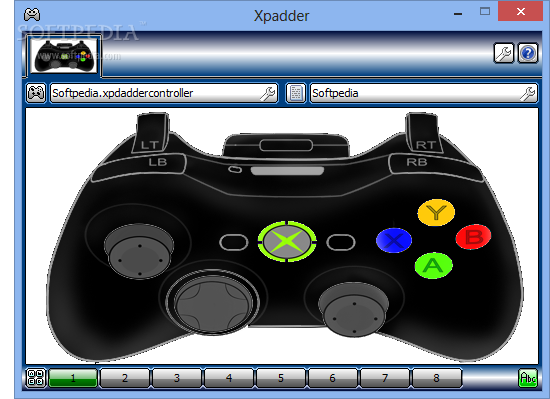
Xpadder is a freeware program (half a megabyte and just one file) that allows you to plug ANY controller into your computer for ANY use. Xbox, PS3, Wii, ANYTHING. It allows you to customly map each individual button to a coresponding key on your keyboard, or a control scheme on your mouse. Heck I used it to turn my Xbox 360 controllers left joystick into a mouse and assigned hotkeys to the buttons which was cool. It is simple, easy, and I would highly recommend you use it. if you wish to see a video tutorial, go here
Let me know if you need any help with it. I'll be here.
MechWarrior 2: 31stCC

-
John Doe117
- I.S. Mech Washer
- Posts: 18
- Joined: Sat Apr 11, 2009 12:49 pm
Re: Somewhat computer inept needing help w/ xp
Just wanted to point out that the "mech exceeds keshisk maximum" message is supposed to be from using a mech chassis more then the amount listed at the top of the screen at the mech lab, has nothing to do with the custom weight. (a Direwolf weighing 65Tons won't be allowed on a 65Ton max mission, because its a 100 ton chassis)
but it sounds more like this is a problem with the game files themselves as Radick suggested the DLL file.
but it sounds more like this is a problem with the game files themselves as Radick suggested the DLL file.